
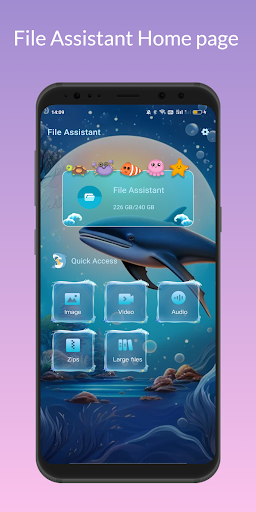





About File Assistant Feature
File Assistant is a comprehensive mobile file management application designed to streamline digital content organization. It serves as a centralized hub for managing documents, media files, and various data types across device storage and cloud services. The app provides intuitive tools for file categorization, transfer, and maintenance, addressing the growing need for efficient digital asset management on mobile platforms. Its cross-platform compatibility and user-focused design make it accessible to both casual users and professionals seeking robust file management capabilities.
Chapter 1: Function
File Assistant delivers core functionality through multiple integrated modules. The file explorer provides hierarchical navigation through device storage with thumbnail previews for images and documents. File operations include copy, cut, paste, delete, and batch processing capabilities. The categorization system automatically sorts files by type into dedicated folders for documents, images, videos, music, and downloads. The transfer module enables wireless file sharing between devices using Wi-Fi Direct or local network connections. Additional features include storage analysis with visual charts, duplicate file detection, cloud storage integration with services like Google Drive and Dropbox, and a built-in file viewer supporting common formats. The app maintains a download manager for tracking ongoing transfers and a recycle bin for accidental deletion recovery.
Chapter 2: Value
File Assistant's primary value lies in transforming chaotic digital storage into an organized, accessible system. It eliminates the frustration of searching for files across scattered locations by providing unified access to both local and cloud storage. The app saves significant time through batch operations, allowing users to manipulate multiple files simultaneously rather than individually. Its storage analysis feature helps users identify space-hogging files and unnecessary duplicates, potentially freeing up valuable device capacity. The cross-platform transfer capability removes dependency on cables or internet connectivity for file sharing between devices. For business users, it ensures important documents remain organized and accessible, improving productivity. The intuitive interface reduces the learning curve typically associated with file management systems, making advanced organization accessible to non-technical users. Regular updates maintain compatibility with new file formats and storage services, ensuring long-term utility. By consolidating multiple file management needs into a single application, it reduces the requirement for multiple specialized apps, simplifying the user experience and conserving device resources.
Chapter 3: Scenarios
File Assistant serves diverse user groups across personal and professional contexts. Students utilize it to organize lecture notes, research papers, and project materials by semester or subject, while using the transfer feature to share study materials with classmates. Office workers manage business documents, spreadsheets, and presentations, quickly locating files during meetings or when working remotely. Photographers and content creators use the app to sort visual assets by project or date, transferring large files between devices without compression. Elderly users benefit from the straightforward interface to manage family photos and important documents without navigating complex system menus. Travelers employ the offline access feature to maintain important itineraries and reservations without internet dependency. The app proves particularly valuable for users with limited storage devices, helping them regularly identify and remove unnecessary files to maintain optimal performance. In family settings, it facilitates sharing of media collections between multiple devices while maintaining organizational structure.







