



About Samsung Smart Switch Mobile Feature
Samsung Smart Switch Mobile is an official application developed by Samsung Electronics to simplify the process of transferring data from an old device to a new Samsung Galaxy smartphone or tablet. It serves as a dedicated migration tool, enabling users to seamlessly move their personal content, settings, and applications across devices. The app supports transfers from a wide range of source devices, including other Android phones, iPhones, and even older Samsung feature phones. By establishing a direct wireless connection, typically via Wi-Fi Direct, or using a physical USB OTG (On-The-Go) cable adapter, it ensures a secure and efficient data migration process. This eliminates the need for complex manual transfers or reliance on cloud storage with limited space, making the setup of a new device a quick and hassle-free experience. Its intuitive interface guides users step-by-step, making advanced data transfer technology accessible to everyone, regardless of their technical expertise.
Chapter 1: Function
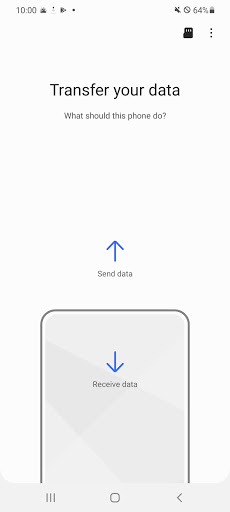
Samsung Smart Switch Mobile performs a singular, core function with high efficiency: comprehensive data transfer. Upon launching the app on both the new Samsung device (the receiver) and the old device (the source), it automatically detects the connection. Users can select the specific types of data they wish to migrate. This includes contacts, call logs, messages, photos, videos, music, documents, calendar events, and device settings like wallpapers and Wi-Fi passwords. A critical function is its ability to transfer applications. When moving from another Android device, it reinstalls apps from the Google Play Store. When migrating from an iPhone, it finds equivalent Android apps and lists them for download. The app also transfers certain data from supported apps themselves. The entire process is managed within a single interface, which displays a real-time progress bar and a summary report upon completion, ensuring users have a complete and verifiable transfer of their digital life.
Chapter 2: Value
The primary value proposition of Samsung Smart Switch Mobile lies in its ability to drastically reduce the friction and time investment associated with setting up a new smartphone. It directly addresses a major pain point for consumers upgrading their devices: the fear of losing precious memories or important information. By offering a seamless, reliable, and comprehensive transfer solution, it enhances customer satisfaction and loyalty towards the Samsung ecosystem. Its key advantages are multifaceted. First, it offers unparalleled convenience, automating a process that would otherwise be manual and tedious. Second, it provides exceptional completeness, moving not just media files but also crucial system settings and app data, making the new device feel familiar from the first use. Third, it is highly versatile, supporting transfers from a broad spectrum of competing platforms, most notably Apple's iOS, which significantly lowers the barrier for users switching to Samsung. Fourth, it ensures security and speed; since the transfer occurs via a direct local connection, data is not stored on intermediate servers, and the transfer rate is typically much faster than uploading to and downloading from the cloud. This combination of features makes it an indispensable tool that adds tangible value to the ownership of a Samsung Galaxy device.
Chapter 3: Scenarios
Samsung Smart Switch Mobile is primarily targeted at two key user groups. The first and most obvious group consists of users who have just purchased a new Samsung Galaxy smartphone and need to migrate their data from an old device. This includes both longtime Samsung users upgrading to a newer model and new converts from other brands, especially iPhone users who may be apprehensive about the switching process. The second group includes individuals who need to perform a device reset and wish to create a backup on another Samsung device before restoring. Everyday use cases are centered around these moments of transition. A common scenario is unboxing a new Galaxy phone; the user is prompted during the initial setup to use Smart Switch, allowing them to have their new device fully personalized and functional within an hour. Another scenario involves helping a family member, such as a parent or child, set up their new phone, using the app to effortlessly transfer all their data for them. For small business users, it ensures a smooth transition between work phones, transferring critical contacts, calendars, and documents with minimal downtime. In each case, the app turns a potentially stressful and complex task into a simple, guided, and successful experience.





