





About CleanMaster Feature
CleanMaster is a comprehensive mobile optimization and utility application designed to enhance device performance and user privacy. It serves as an all-in-one toolkit for smartphones, addressing common issues such as storage clutter, sluggish performance, and security vulnerabilities. By integrating cleaning, boosting, and security features into a single interface, it provides a streamlined solution for maintaining device health. The app is engineered to automatically identify and resolve performance bottlenecks, making it accessible for users of all technical levels. Its proactive approach to device management helps prevent problems before they impact the user experience, ensuring smoother and more efficient daily operation of the mobile device.
Chapter 1: Function
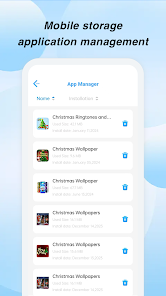
CleanMaster operates on several core functional pillars to optimize device performance. Its primary function is junk file cleaning, which involves scanning the system for residual files, app caches, temporary data, and obsolete APKs that accumulate over time and consume valuable storage space. Upon user approval, it safely removes this digital clutter. A second critical function is the memory booster and CPU cooler, which terminates background processes and apps that are not in active use, freeing up RAM and reducing processor load to prevent overheating and lag. Furthermore, the app includes a security scanner that checks for malware and potential privacy threats within installed applications. Additional utilities often encompassed are a duplicate file finder to remove redundant photos and documents, a notification history manager, and a battery-saving mode that optimizes system settings to extend battery life. These functions work in concert through an automated scanning process, delivering a comprehensive device maintenance solution.
Chapter 2: Value
The value proposition of CleanMaster lies in its ability to deliver a noticeably faster, cleaner, and more secure mobile experience with minimal user effort. Its key advantage is the consolidation of multiple essential maintenance tasks into a single, user-friendly application, eliminating the need for users to download and manage several disparate tools. By regularly clearing junk files and boosting memory, the app directly combats device slowdown, reducing app load times and preventing frustrating system freezes. This proactive maintenance can also contribute to the longevity of the device's hardware, particularly the battery, by minimizing unnecessary strain. From a security standpoint, it provides a layer of defense against potentially unwanted applications and privacy-invasive software, offering users peace of mind. The app's interface is designed for simplicity, often featuring one-tap optimization that makes advanced device maintenance accessible to non-technical users. This empowerment allows individuals to take control of their device's health without requiring deep technical knowledge, saving them time and potential frustration. The tangible results of reclaimed storage space, improved responsiveness, and enhanced security represent a significant return on investment for the user, making CleanMaster a valuable utility for everyday smartphone use.
Chapter 3: Scenarios
CleanMaster is ideally suited for a broad spectrum of smartphone users, particularly those who encounter daily performance issues. The primary target group includes individuals with mid-range or older devices that have limited storage capacity and RAM, as these users are most affected by the accumulation of junk files and background processes. They benefit from the app's ability to free up space for new photos, videos, and applications while restoring device speed. Another key user segment comprises privacy-conscious individuals who install numerous apps and need a tool to monitor and manage app permissions and potential threats. Students and young professionals, who rely heavily on their phones for communication, entertainment, and work, can use the app's one-tap boost feature before starting resource-intensive tasks like gaming or video editing to ensure optimal performance. Furthermore, less tech-savvy users, such as older adults, find value in the app's automated nature; it simplifies complex maintenance tasks into a single action, helping them keep their devices running smoothly without needing to understand the underlying technical details. Common use cases involve running a quick clean after extensive web browsing or app usage, performing a security scan after installing new software, and using the memory boost when the device begins to feel sluggish.







