





About Samsung Voice Recorder Feature
Samsung Voice Recorder is a powerful and intuitive audio recording application pre-installed on many Samsung Galaxy devices. It is designed to capture high-quality audio with ease, offering a suite of features that go beyond simple recording. The app provides a clean, user-friendly interface that allows for quick starting, stopping, and management of recordings. It supports various recording modes tailored for different environments, from lectures and meetings to personal memos and interviews. With integrated transcription services and robust organization tools, Samsung Voice Recorder positions itself as an essential productivity tool for students, professionals, and anyone in need of reliable audio capture on their mobile device.
Chapter 1: Function
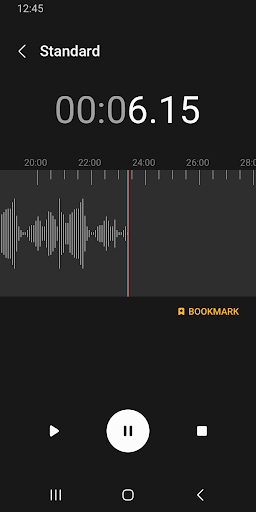
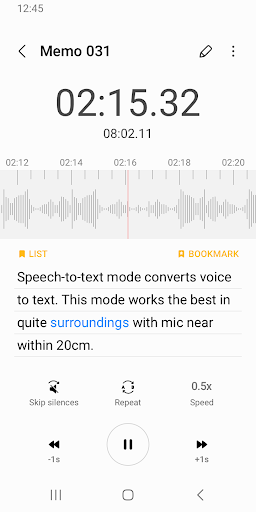
Samsung Voice Recorder's core functionality centers on capturing, processing, and managing audio recordings. The app allows users to start a new recording with a single tap, offering multiple quality settings to balance audio clarity with file size. A key feature is its selection of intelligent recording modes. Standard Mode is for general use, Interview Mode optimizes for a two-person conversation using the device's stereo microphones, and Speech-to-Text Mode simultaneously records audio and generates a live transcript. For music, a dedicated Music Mode enhances frequency response. Post-recording, users can trim audio files, add bookmarks during playback for easy reference, and categorize recordings with custom labels. All files are neatly organized within the app's library for quick retrieval and playback.
Chapter 2: Value
The primary value of Samsung Voice Recorder lies in its seamless integration of high-fidelity recording with intelligent software features, creating a comprehensive audio tool. Its most significant advantage is the real-time transcription capability, which can save users hours of manual work by converting speech to text directly within the app. This feature, powered by advanced AI, is highly accurate and allows for easy editing and exporting of the text. The app's specialized recording modes ensure optimal audio quality in any scenario, making it more versatile than a basic recorder. The organization system, with bookmarks and folder management, transforms a collection of recordings into a searchable audio database. Furthermore, its deep integration with the Samsung ecosystem ensures stable performance and easy sharing to other apps on the device. By combining robust hardware utilization with smart software, the app delivers exceptional convenience, efficiency, and accuracy, empowering users to capture information in the most usable format possible without needing multiple separate applications.
Chapter 3: Scenarios
Samsung Voice Recorder is ideally suited for a diverse range of users and daily situations. Students are primary beneficiaries, using the app to record lectures for later review, with the transcription feature being invaluable for creating study notes. Journalists and interviewers rely on its Interview Mode to capture clear, distinct audio from their subjects and generate instant transcripts for article drafting. Professionals in business meetings use it to ensure no detail is missed, bookmarking key discussion points for easy navigation. Musicians and composers utilize the high-quality Music Mode to quickly capture melodic ideas or song snippets. Additionally, it serves as a reliable tool for anyone needing to dictate personal memos, reminders, or creative ideas on the go. In essence, any individual who frequently needs to capture spoken information accurately and access it efficiently will find Samsung Voice Recorder an indispensable application.







