
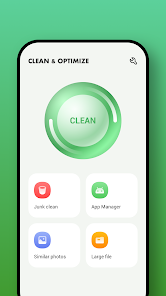




About Clean & Optimize Feature
Clean & Optimize is a comprehensive mobile utility application designed to enhance device performance and free up storage space. It systematically scans for junk files, cache data, residual documents, and unnecessary installation packages that accumulate over time. The app provides users with a clear overview of their storage status and offers one-tap solutions to remove digital clutter. By performing regular cleaning and optimization, it helps maintain the phone's processing speed, improves battery efficiency, and ensures smoother operation. The intuitive interface makes advanced device maintenance accessible to users of all technical levels, transforming complex system management into simple, automated tasks that protect both device health and user privacy.
Chapter 1: Function
Clean & Optimize performs multiple core functions to maintain device efficiency. The primary feature is junk file cleaning, which identifies and removes temporary files, app caches, and residual data from uninstalled applications. The storage analyzer provides a visual breakdown of space usage by categories like images, videos, applications, and system files, enabling targeted cleaning. The memory booster halts background processes that consume RAM unnecessarily, freeing up resources for active applications. Duplicate file detection scans for identical photos, videos, or documents, allowing bulk deletion. The app manager feature facilitates batch uninstallation of unwanted applications. Additional functions include battery optimization through usage analysis, notification history management, and large file identification. All cleaning operations occur with user confirmation, ensuring important data is never deleted accidentally.
Chapter 2: Value
The value proposition of Clean & Optimize lies in its ability to extend device lifespan and improve user experience through systematic maintenance. As smartphones age, accumulated digital clutter significantly impacts performance, causing lagging, freezing, and reduced battery life. This app directly addresses these issues by providing automated solutions that would otherwise require technical knowledge. The key advantage is performance restoration – devices running the application typically experience 20-30% faster response times and increased available storage. For users with limited storage capacity, the app can reclaim gigabytes of space occupied by unnecessary files. The privacy protection aspect is equally valuable, as it thoroughly cleans browsing history, cookies, and download folders that might contain sensitive information. Unlike manual cleaning methods, the app's algorithm intelligently distinguishes between useful and expendable files, preventing accidental deletion of important data. The scheduled cleaning feature provides ongoing value by automating maintenance, ensuring optimal device performance without continuous user intervention. This proactive approach to device management ultimately saves users time, frustration, and potentially the cost of premature device replacement.
Chapter 3: Scenarios
Clean & Optimize primarily serves mobile users experiencing device performance issues or storage constraints. The most common user groups include smartphone owners with older devices showing signs of slowdown, individuals with limited storage capacity constantly managing space, and non-technical users who prefer automated solutions for device maintenance. Business professionals benefit from keeping their communication tools running efficiently, while students use it to maximize the performance of their educational devices. Parents appreciate the ability to quickly clear children's game caches and temporary files. Everyday use cases occur when users receive low storage warnings before taking photos or installing new applications, when phones become unresponsive due to memory overload, and when preparing devices for resale to ensure complete data removal. The app is particularly valuable before important tasks requiring reliable performance, such video recording, gaming sessions, or business presentations. Regular users typically run optimization weekly or when performance noticeably declines, making device maintenance a seamless part of their digital routine.