





About PDF Reader, PDF Viewer Feature
PDF Reader, PDF Viewer is a versatile and powerful mobile application designed for seamless interaction with PDF documents. It serves as a comprehensive tool for opening, viewing, annotating, and managing PDF files directly on smartphones and tablets. Available on both iOS and Android platforms, this app combines a user-friendly interface with robust functionality, eliminating the need for multiple document management apps. It supports a wide range of operations from basic viewing to advanced editing, making it an indispensable utility for students, professionals, and anyone who regularly works with digital documents. Its core purpose is to provide a reliable, fast, and feature-rich PDF experience on the go.
Chapter 1: Function
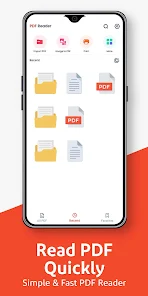
PDF Reader, PDF Viewer excels in providing a comprehensive suite of tools for handling PDF documents. Its core functionality begins with lightning-fast file opening and smooth scrolling, supporting various viewing modes like single-page, continuous scroll, and presentation mode. The app allows users to easily annotate documents with highlights, underlines, strikethroughs, and freehand drawings. Text-based comments and sticky notes can be added for detailed feedback. It includes powerful form-filling capabilities, enabling users to complete interactive PDF forms seamlessly. Basic text editing and redaction tools are also available. File management is intuitive, with features for organizing documents into folders, bookmarking important pages, and performing text searches within a document. Furthermore, it supports merging multiple files, splitting large PDFs, and converting documents from other formats into PDF, consolidating essential document tasks into a single application.
Chapter 2: Value
The primary value of PDF Reader, PDF Viewer lies in its ability to transform a mobile device into a fully-functional PDF workstation, promoting productivity and efficiency. Its key advantage is the consolidation of multiple discrete functions—viewing, annotating, editing, form-filling, and file conversion—into a single, cohesive application, which saves users time and the hassle of switching between different apps. The app delivers exceptional performance by ensuring quick load times and fluid navigation, even for large, complex PDF files, enhancing the user experience significantly. For professionals, the robust annotation and form-filling tools streamline document review and approval processes, reducing paperwork and accelerating workflows. Students benefit from the ability to mark up lecture notes and textbooks directly on their devices. The app's strong file management and organization features help users maintain a clutter-free digital workspace. By offering a powerful free version complemented by a pro version with advanced features, it provides tremendous value, making professional-grade PDF tools accessible to a broad audience without a substantial upfront investment. This combination of power, convenience, and affordability establishes it as a superior choice in the mobile PDF utility market.
Chapter 3: Scenarios
PDF Reader, PDF Viewer is ideally suited for a diverse range of users across various everyday situations. Students represent a primary user group, utilizing the app to read and annotate academic papers, textbooks, and lecture slides. They can highlight key passages, add notes for study revision, and organize all their course materials in one place. Office professionals and business travelers form another core demographic, relying on the app to review contracts, mark up reports, and fill out expense forms or applications while away from their desks, ensuring continuous productivity. Researchers and academics use it to read and critique journals and manuscripts on their tablets. Furthermore, any individual dealing with personal documentation, such as tax forms, insurance paperwork, or boarding passes, will find the app invaluable for quick access and simple interactions. Common use cases include a manager reviewing a project proposal during their commute, a freelancer signing a digital contract sent by a client, or a traveler checking their itinerary without needing to print documents. Essentially, any scenario requiring reliable and immediate access to PDF documents is perfectly served by this application.