



About Manus AI Feature
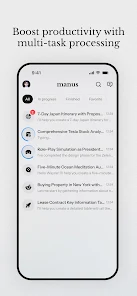
Manus AI is an innovative mobile application that leverages advanced artificial intelligence to transform handwritten notes, sketches, and documents into digital, editable, and organized formats. It serves as a intelligent bridge between the physical act of writing and the digital world, catering to students, professionals, and creatives who seek to enhance their productivity. By utilizing sophisticated computer vision and machine learning algorithms, the app accurately recognizes and digitizes handwritten content from various surfaces, making information management seamless and efficient. Manus AI stands out by preserving the personal touch of handwriting while unlocking the powerful advantages of digital data, including searchability, easy sharing, and cloud storage.
Chapter 1: Function
Manus AI core functionality centers on the real-time digitization and intelligent processing of handwritten content. Users simply capture an image of their handwritten notes, lists, or drawings using their device camera. The app then employs advanced Optical Character Recognition technology, specifically trained for diverse handwriting styles, to convert the ink strokes into editable digital text. Beyond mere transcription, it can identify and separate different elements on a page, such as text, mathematical equations, and simple diagrams. The app allows for immediate editing of the converted text, correction of recognition errors, and reorganization of content. Furthermore, it supports exporting the digitized notes to various formats including plain text, PDF, or directly to cloud storage services and note-taking applications, creating a fluid and integrated digital workflow from a physical starting point.
Chapter 2: Value
The primary value proposition of Manus AI lies in its ability to merge the cognitive benefits of physical writing with the unparalleled utility of digital organization. A key advantage is the significant enhancement of productivity. By digitizing notes, users can instantly search through vast amounts of handwritten information, a task that is impractical with physical notebooks. This saves considerable time and reduces frustration in locating specific details. Secondly, it ensures data preservation and accessibility. Physical notes can be lost or damaged, but Manus AI secures them in the cloud, accessible from any device, anytime. The app also promotes better organization, allowing users to tag, categorize, and link digitized notes, creating a structured personal knowledge base. For students and professionals, this is invaluable for study and project management. Another critical value is its facilitation of collaboration. Handwritten ideas can be instantly shared as editable documents with colleagues or classmates, streamlining the feedback and iteration process. Unlike generic scanning apps, Manus AI is specifically optimized for the nuances of handwriting, delivering higher accuracy and more context-aware processing, which translates to a more reliable and user-friendly experience.
Chapter 3: Scenarios
Manus AI is ideally suited for students, researchers, creative professionals, and anyone who frequently relies on handwritten notes. Students are primary users, utilizing the app to digitize lecture notes for easy revision, creating searchable study guides, and archiving solutions to complex problems. They can quickly share notes with peers who missed a class. Researchers and journalists benefit by digitizing field notes, interview transcripts, and brainstorming sessions, making their raw data easily sortable and analyzable. In a professional context, business professionals can use Manus AI during meetings to capture whiteboard diagrams and action items, converting them into shareable digital minutes instantly. Creative professionals, such as designers and writers, can use it to digitize early-stage sketches, storyboards, and plot ideas, integrating them into their digital workflow without losing the original creative spark. Everyday scenarios include digitizing grocery lists, to-do lists, and personal journal entries, ensuring these snippets of information are never lost and can be accessed from a smartphone at any moment.