




About magicplan feature
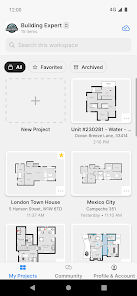
magicplan is a leading mobile application for creating detailed floor plans, property inspections, and estimates directly on a smartphone or tablet. It leverages augmented reality and computer vision technology to allow users to generate accurate architectural drawings simply by capturing their surroundings with the device camera. The app is widely utilized across various sectors including real estate, insurance, restoration, and facility management. By transforming complex measurement and drafting tasks into a streamlined, intuitive process, magicplan empowers professionals and homeowners alike to document spaces with professional-grade precision and efficiency, eliminating the need for manual tools or specialized training.
Chapter 1: Function
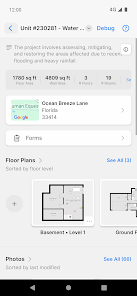
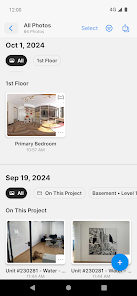
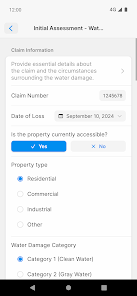
The core functionality of magicplan revolves around its ability to create precise floor plans and reports effortlessly. Users begin by launching the app and using their device camera to capture the corners of a room. The app's augmented reality engine automatically detects these points and calculates distances, constructing the room's outline in real-time. As users move through a space, they can add doors, windows, and furniture from an extensive built-in catalog. Furthermore, magicplan enables the creation of multi-story plans, adding dimensions, annotations, and area calculations automatically. Once a plan is complete, it can be exported in various formats such as PDF, JPG, DXF, and even shared via web link. Additional functions include generating detailed reports with cost estimates, material lists, and immersive 360-degree views, making it a comprehensive tool for space documentation.
Chapter 2: Value
magicplan delivers immense value by dramatically increasing efficiency, accuracy, and professionalism in space measurement and planning. Its primary advantage lies in saving significant time and resources; what traditionally required manual measurement with tape measures, pencils, and paper can now be accomplished in minutes with a smartphone, reducing human error and rework. The app's professional output, including industry-standard file formats, enhances credibility for contractors, real estate agents, and inspectors, allowing them to present clients with clear, detailed visual data. This leads to better communication, faster project approvals, and more accurate quoting for jobs. For businesses, magicplan integrates with various software ecosystems and offers cloud storage for team collaboration, centralizing project data. The cost-effectiveness is another key value, as it replaces the need for expensive, specialized surveying equipment. Ultimately, magicplan democratizes architectural drafting, making sophisticated planning tools accessible to a broad audience, from seasoned professionals to DIY homeowners, thereby streamlining workflows and improving project outcomes across the board.
Chapter 3: Scenarios
magicplan is ideally suited for a diverse range of users and everyday situations. Property managers and real estate agents frequently use it to create accurate floor plans for rental listings and property sales, providing potential tenants or buyers with a clear layout. In the insurance and restoration industries, adjusters and technicians utilize the app to swiftly document damage, take measurements for claims, and generate scopes of work, significantly speeding up the assessment process. Contractors, architects, and interior designers rely on magicplan for initial site surveys, space planning, and client presentations, ensuring designs are based on precise measurements. Facility management teams use it to maintain up-to-date records of building layouts for maintenance and renovations. Even homeowners find it invaluable for planning furniture arrangements, home improvement projects like kitchen remodels, or simply for creating a record of their property. In any scenario requiring a quick, reliable, and professional representation of a physical space, magicplan serves as an essential tool.